0
Your Cart
0
Your Cart

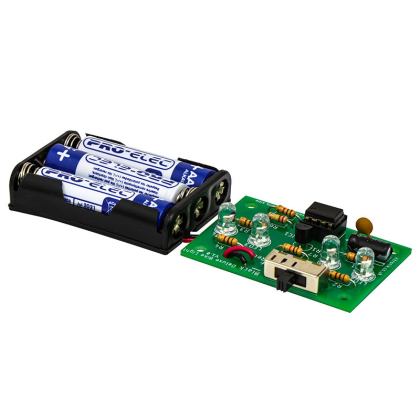
This kit can be used to make a shed or room alarm when mounted on the top of a door, drawers or any other object with a moveable opening. It can also be used by replacing the micro switch with a magnetic door contact.

A micro switch acts as a trigger mechanism and is armed / disarmed by a seperate sliding switch. The door’s movement is detected by a micro switch mounted onto a door or object with a lid. A timer provides an entry delay during which the system can be disarmed by the slide switch, whilst a separate timer silences the alarm after two minutes. Both of these timers are implemented via a 556 dual timer IC.

The alarm can be further enhanced by using a simple key switch for arming / disarming or by replacing the micro switch with a magnetic door contact switch to activate it. The board, battery pack & buzzer can be placed into a box designed by the student.

Features:

Contents:

Possible applications include:

  • Adding an alarm to a cookie/biscuit tin.
  • Adding an entry alarm to a door.

Dimensions:

  • PCB Length: 51mm.
  • PCB Width: 41.5mm.

Requires:

Resources:

This kit is supplied in a simple grip seal bag.

Note:

 This is an educational kit and should not be used to secure anything of value.
Documents & downloads

This kit is supplied in a simple grip seal bag.

Note:

 This is an educational kit and should not be used to secure anything of value.
Related resources

Reviews

There are no reviews yet.

Be the first to review “Kitronik Alarm Project Kit”

Your email address will not be published. Required fields are marked *

Questions and answers

    HiI notice that the batteries don't last very long for this alarm.Will it run on only 5 V. I ask because if it would I could run it off my Raspberry PI continuously rather than keep having to buy new Batteries ( which isn't very green )Thanks
  1. 0 votes
    Q HiI notice that the batteries don't last very long for this alarm.Will it run on only 5 V. I ask ...... Read more
    Asked by john simmonds on March 30, 2020 12:00 am
    Answered by the admin Hi John, Thank you for your question, it would need to be 5V or a power source close in value to that I am afraid. Best Regards Cullen
  2. Note that in How the Circuit Works in the instruction booklet the 2.2K ohm resistor is actually the 220K ohm one provided in the kit. It looks like the circuit functions as a 1-shot, so that to re-enable it I need to cycle the power. Is that correct? If so, I will add a Normally Open switch on the power line as a Reset.
  3. 0 votes
    Q Note that in How the Circuit Works in the instruction booklet the 2.2K ohm resistor is actually t...... Read more
    Asked by Diane Brancazio on March 11, 2019 12:00 am
    Answered by the admin Hi Diane, Thank you for your question, you should not need to power cycle the kit to re-enable it from what I have tried. Could you point me to the particular point with the note about the 2.2K resistor. I have had a look over the instructions today and could not find a mention of a 2.2K resistor but could easily have missed it! Best Regards Cullen
  4. Please could you explain how to connect the Magnetic Door Contact Switch to the circuit? Thank you.
  5. 0 votes
    Q Please could you explain how to connect the Magnetic Door Contact Switch to the circuit? Thank you.
    Asked by Kirsty on February 26, 2019 12:00 am
    Answered by the admin Hi Kirsty, Thank you for your question, so the magnetic switch comes with two parts a switch and a magnet, both in a white plastic casing. The switch is triggered on and off by the magnet being moved away from the switch. In the alarm circuit you would solder the switch into where the micro lever switch normally sits. The switch is the part with the metal contacts on the bottom. If you were going to trigger the alarm when the door opened then you would affix the magnet to the back of the door and the alarm so that the switch is nearly touching the magnet. When the door is opened the magnet would be moved away thus triggering the alarm circuit. I hope this makes sense it should be an easy change over but any other questions let me know. Best Regards Cullen
  6. Can I change the output to LED without a problem?
  7. 0 votes
    Q Can I change the output to LED without a problem?
    Asked by rico on December 7, 2018 12:00 am
    Answered by the admin HI Rico, Thank you for your question, you should be able to change that over relatively easily though depending on the LED you may need to add a resistor in. Best Regards Cullen
  8. Is there any way that we can request a CD Rom with extra teaching notes? I'm no school.
  9. 0 votes
    Q Is there any way that we can request a CD Rom with extra teaching notes? I'm no school.
    Asked by Matthew Drinkall on August 8, 2013 12:00 am
    Answered by the admin Hi Matthew, I emailed you the pdf of the notes for this project kit. Let me know if you want any of the others.
  10. How long would this kit take to assemble?
  11. 0 votes
    Q How long would this kit take to assemble?
    Asked by Meerav Shah on May 7, 2013 12:00 am
    Answered by the admin It would take roughly between 10 and 20 minutes depending on how good you are at soldering. Maybe a bit longer if you have not soldered before.
To submit a question, please login or create an account