
Buy locally scheme
Overview
At Kitronik we want to make sure any customers in your country that are browsing the Kitronik website can easily find and buy the corresponding product on your website, so we have introduced the buy locally scheme to make this easy. The scheme is available on all Kitronik manufactured products and to all distributors located outside of the UK.
What the customer sees
When the customer is on a product page where one or more distributors have the item they will see the “Buy locally” information in the right side bar:
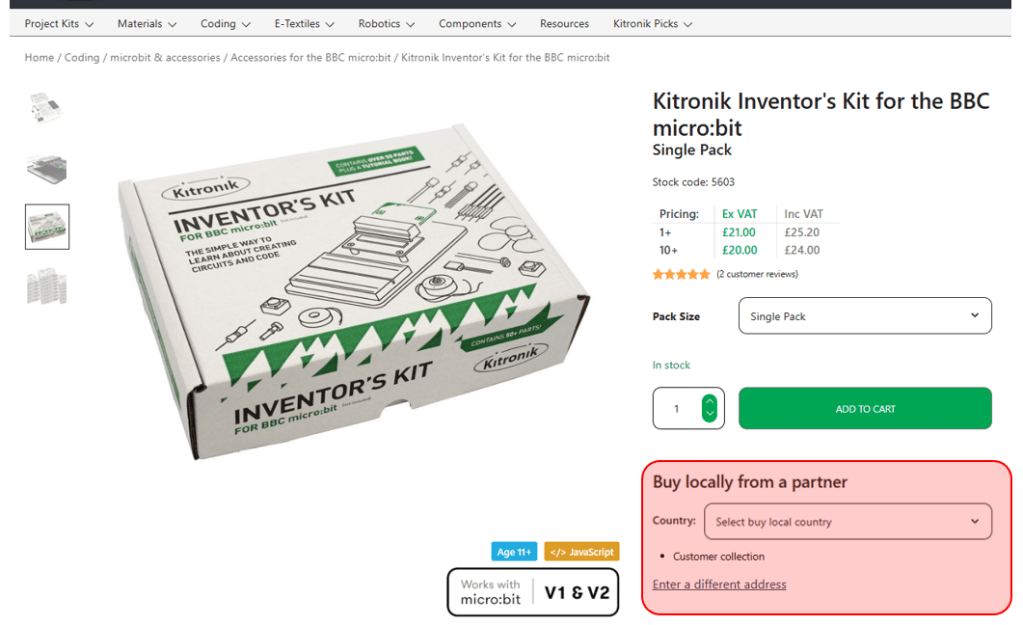
When they click on the select country drop down they can pick the country where the goods are to be shipped to and the page updates to show the companies that are located in their chosen country, followed by the companies that can ship to that country:
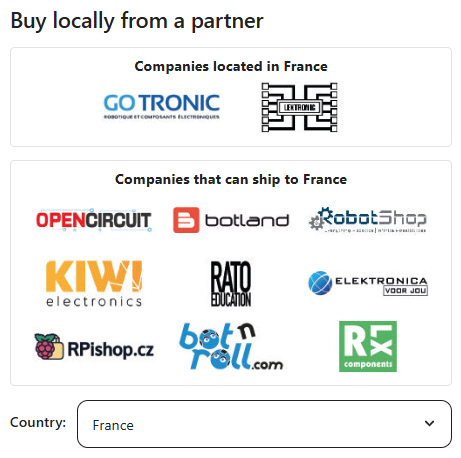
The customer then clicks on the logo of the company they wish to buy it from and are taken directly to the product on the distributors website. Why not check it out yourself, the Kitronik inventors kit for the BBC micro:bit is a good page to have a look at. When more than one company is shown the distributor that stocks the most Kitronik manufactured products will be listed first.
How does the back end work?
In order to use this service we need to tag your account with the information on which logo to use and what countries we should list, please get in touch and ask for this to be set up on your account. Once it has been set up, you navigate to the product page and select the “Distributor Information” tab:

Once expanded along with the product attributes you will see the “Buy locally” form, looking something like this:

As long as your account has been configured it will show the name of your company (1), along with the logo that will be displayed to customers (2). Then there is a list of all the countries where you have warehouses and the countries you can ship to (3). You can’t edit any of this information, so if any of it is wrong you should let us know so we can correct it before you start linking products. If a lot of countries are listed it is possible to click on the list and use the arrow keys to scroll right through the list.
Having checked this data is correct, you should go on to your website and find the same product. It is then just a case of copying the URL from the navigation bar in your browser and pasting it in to the field on our form (4). When you click the add link button (5) it will add your companies logo on to the page and when pressed link the user back to the product on your website.
Scheme rules
For a country to be included delivery must be at a sensible cost (must be under the equivalent of £20). This cost must include all duty, VAT, admin charges etc when shipping to other countries, ensuring the customer can make an informed choice when selecting a supplier to purchase from.
The scheme is not available to UK distributors.
Products:
- Limited to Kitronik manufactured products, not other more general product lines.
Ranking:
- This will be based on the qty of different product lines listed by the distributor.
Requirements:
- Distributor account has been tagged to allow “buy locally” (Kitronik to do).
- Distributor (themselves) to add link on product page linking only to the same product on their website.
- Note, if links to other products or non-relevant products are found to be used Kitronik reserve the option of removing this feature for that distributor.
- The data used to show links by country is stored per product, so it is imperative that you make sure the list of countries is as you expect before you start linking products. If you later decide to request additional countries are added then you will need to update these products to show the additional countries.